
Capoflow prints checks on the pre-printed voucher stock you already buy, tracks every check number, and settles the bill the check paid. The bill it settles is marked paid in the same action, and the expense stays on the job.
Check printing is included on the Business plan. 14 day free trial, no credit card required.
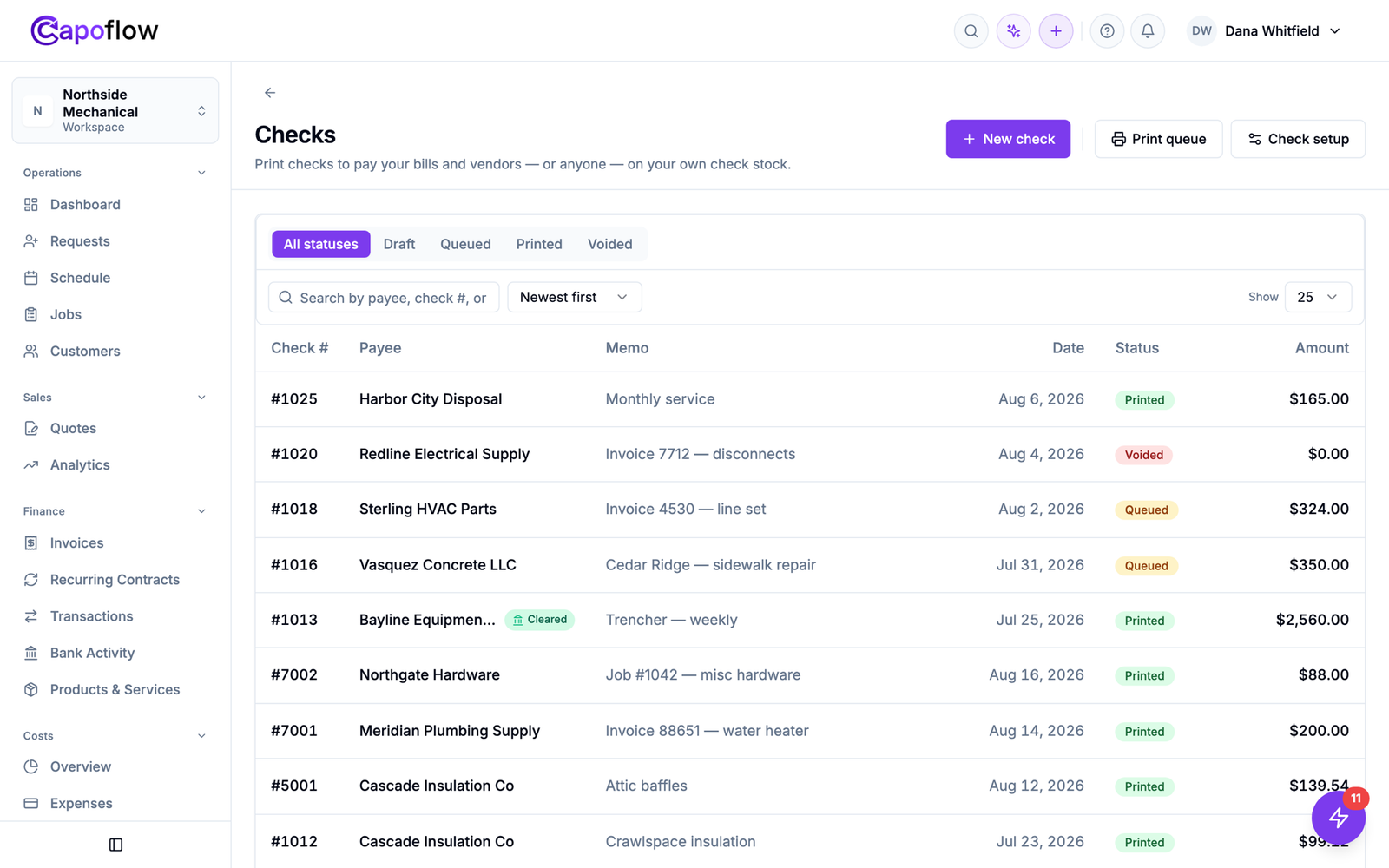
Every check you have written, with its number, the bill it paid, and whether it has cleared the bank.
Check printing here is wired into the bills, jobs and vendors you already track, so writing the check and recording what it paid are the same step.
Prints onto standard pre-printed voucher checks, the kind with the check on top and two stubs below, from your bank or any check supplier. Capoflow fills in only the variable fields. Your bank line, routing and account numbers are never printed over.
Print a test page, nudge the layout in roughly one millimetre steps until it lands, then confirm. Each checkbook keeps its own calibration, so two bank accounts on two different stocks both register correctly.
Select a stack of queued checks, set the starting check number, and print the run. Stop halfway and pick it up later. Capoflow refuses to hand out a number another run already used.
Job materials, shop overhead, or one supplier bill split across several jobs. All three settle the same way, and paying a bill never changes how its cost was allocated across your jobs.
The payee name and mailing address are captured onto the check when it is created. Editing that vendor months later never rewrites a check you already mailed.
Jammed sheet, wrong amount, lost in the mail. Void it or reprint it. The bill reopens, the history stays intact, and the voided number remains on record so your numbering has no silent gaps.
A vendor. The supplier, subcontractor or service you already buy from.
A customer. When you owe a refund or a deposit back, their details fill in automatically.
A saved payee. The landlord, the county, the insurer. Somewhere you pay often that is not a vendor.
A one off. Type the name, print the check, move on. Nothing saved you did not ask to save.
A job cost. Materials for Job 1042. The cost stays on that job and the margin updates.
An overhead bill. Rent, insurance, the software subscription. A business expense, not attached to any job.
A split bill. One supplier invoice spread across four jobs. Paying it never disturbs how the cost was divided.
Queue checks as you approve bills through the week, then print them together. Pick the checkbook, confirm the starting number matches the stock in the tray, select the run, and go. If the printer jams on check three, the run resumes. Capoflow knows which numbers were consumed and which are still available.
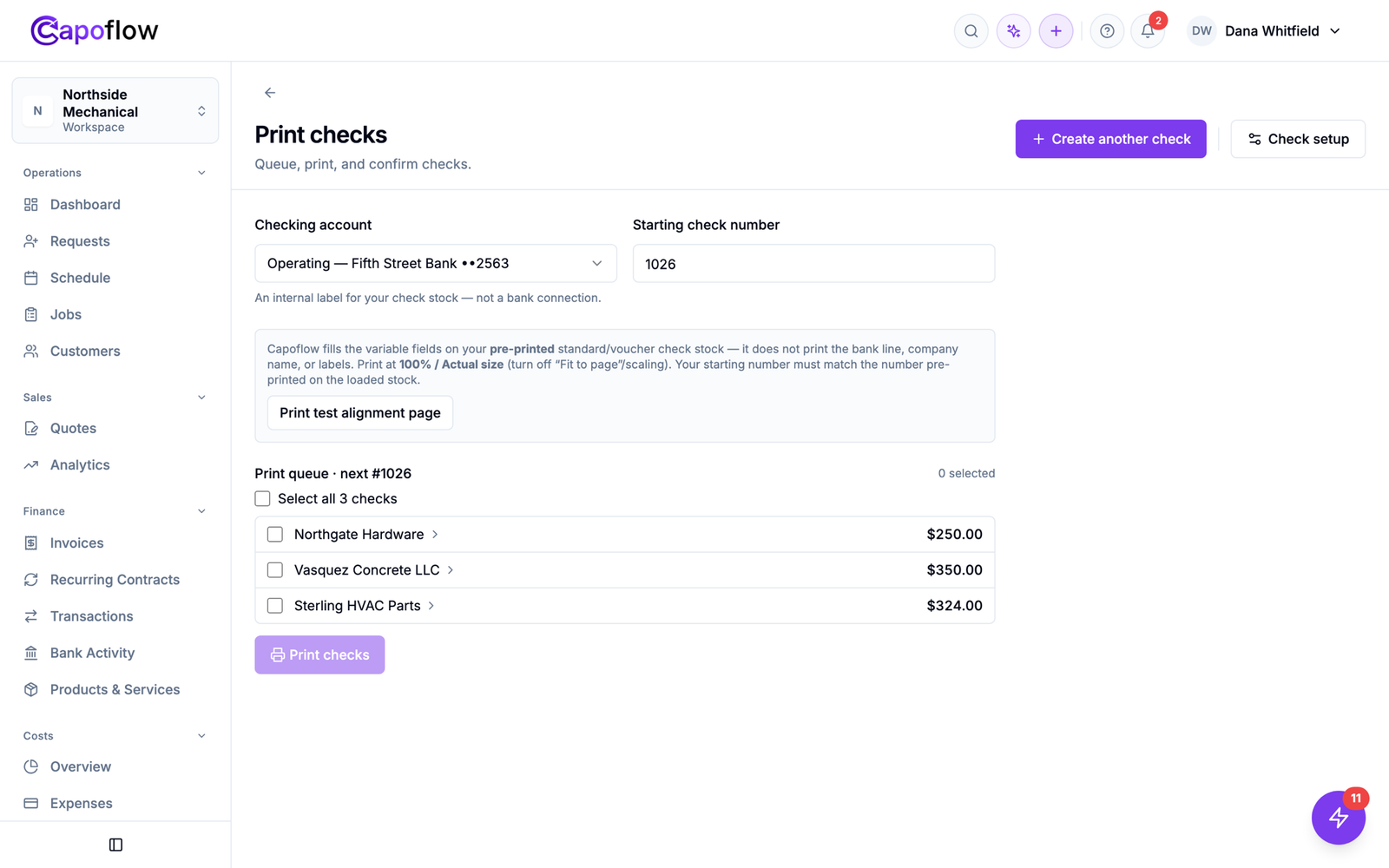
A printed check settles a real bill in Capoflow, so the cost lands on the job it belongs to the moment you print. Job profit updates itself. Connect the bank account and it closes the loop: when the check hits your statement, Capoflow matches it and marks it cleared.
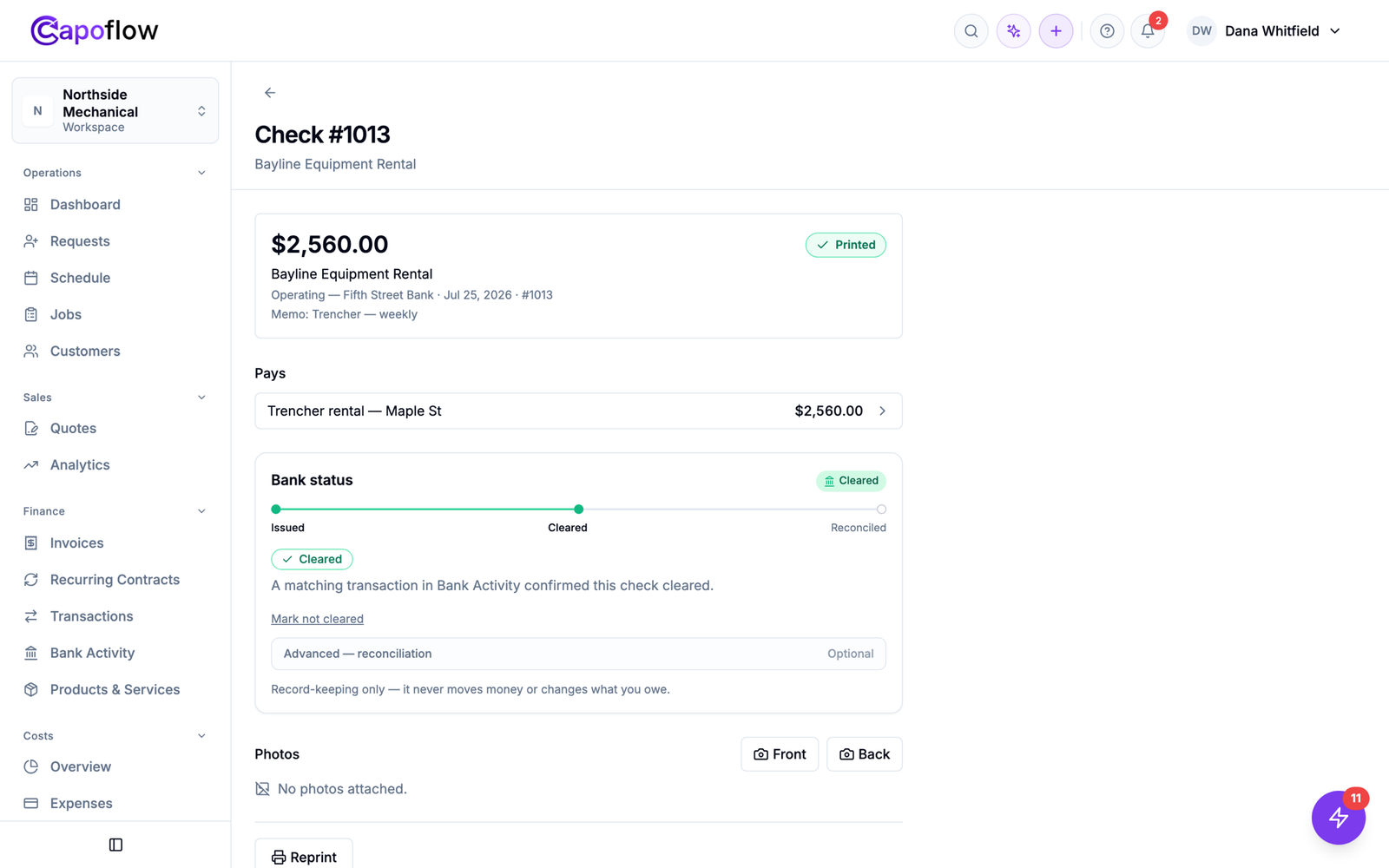
A printed check is not a document Capoflow generates and forgets. It is tied to the bill it settles, the job that bill belongs to, and the bank line that eventually clears it.
Every check settles a real bill in Capoflow. Printing it, marking the bill paid and recording the payment are one action, not three.
When a check pays a job’s bill, that cost sits on the job. Its margin reflects the payment from the moment the check prints.
Checks, bills, expenses and payments live together, so did we pay that, and against what, is one search instead of three.
Name it, add the mailing address, and tell Capoflow the next check number sitting in your printer tray.
Print the alignment test on plain paper, hold it against a real check, nudge until it registers, confirm.
Pick a bill, choose who to pay, and queue it. Do this as bills come in through the week.
Load the stock, select the queued checks, print. Each bill is marked paid and each cost stays on its job.
Card payments cover a lot of a service business, but not the parts that matter most to cash flow. These are the payments that still come back to paper.
Framers, electricians, haulers. Paid per job, often per draw, and every one of those costs needs to land on the job it came from.
Trade accounts still bill monthly and still want a check. One statement can carry materials for six different jobs.
Weekly rentals, repairs, and the fees nobody takes a card for. Attach it to the job or leave it as overhead.
When a deposit has to go back to a customer, their name and address are already on file. Print the check and the credit closes out.
Pre-printed voucher check stock. That is the format with the check on top and two stubs beneath, sold by every check supplier and by your bank. Capoflow prints the date, payee, amounts, mailing address and memo onto it. It never prints the MICR line, routing number or account number, so your checks stay bank valid.
Yes. Each bank account is a separate checkbook with its own check numbering, mailing address and print alignment, so a second account on different stock lines up independently.
Print the built in alignment test, nudge the layout horizontally or vertically in roughly one millimetre steps until it registers against your stock, then confirm it. The setting saves to that checkbook and every future check uses it.
No. Capoflow produces the paper check and records the payment against the bill it settles. It never initiates a transfer and never stores your banking credentials. The check moves money the same way it always has, when the payee deposits it.
Void it or reprint it. The bill it was paying reopens, the check keeps its full history, and the voided number stays on record so your numbering has no unexplained gaps.
Check printing is included on the Business plan, alongside inventory tracking, advanced asset analytics, customer statements and Bank Activity.
Connect an account read only and Capoflow matches cleared checks for you.
Run your business with clarity.
Keep your work, money, customers, and team connected. Know what’s happening, where your money is going, and what needs attention.
Every job. Every dollar. Every detail.

