
Connect your accounts and cards read only. Capoflow matches what cleared against the expenses, bills, invoices and checks you already have, then shows you only the handful it could not place. A short list, not a bookkeeping inbox.
Bank Activity is included on the Business plan, for account owners and admins. 14 day free trial, no credit card required.
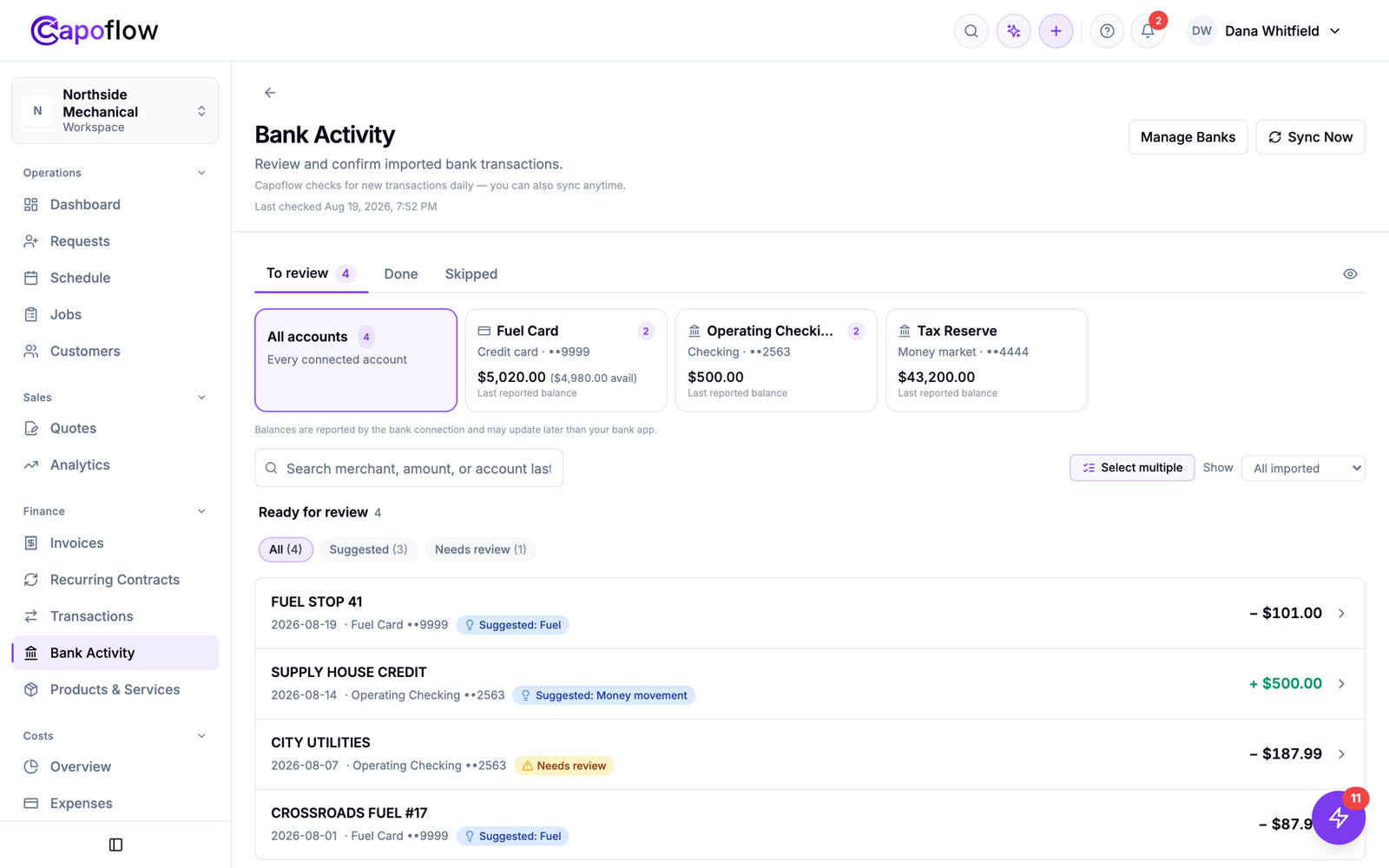
A real week of activity across three connected accounts. Four things needed a human. The rest resolved themselves.
You already recorded the work. Capoflow uses your bank activity to confirm it, attribute it to the right job or truck, and quietly close the loop.
Capoflow can see transactions. It cannot move money, send an ACH, or store your banking credentials. The connection runs through Plaid, and you choose which accounts and cards sync at all.
A transaction that lines up with something you already recorded gets a checkmark on that record. Nothing to approve, nothing to file. One tap undoes it if it ever guesses wrong.
Mark a card as your fuel card and its charges become vehicle costs. Mark an account as non operational and its noise disappears. You pick from named uses and never write rules.
Fuel charges attribute to a specific vehicle, so what each truck actually costs to run stops being a guess and becomes a number you can look up.
Money moving between two accounts you own is paired and suppressed, instead of landing twice in your expenses and quietly ruining the month.
Anything that would create a new record takes a deliberate click, often one click for a whole batch. Silence is only ever used to confirm something you already have, or to hide noise.
There are no rules to build. You answer what each account is mainly used for, and that single answer is what keeps the rest of it quiet.
Operating. The main account. Money out looks like an expense, money in looks like a customer payment.
Fuel and vehicles. A fuel card tied to one truck. Its charges become that truck’s running cost.
Financing. A loan or line of credit. Movements are recorded but stay off your profit and loss.
Do not make suggestions. A tax reserve or an account that is not operational. Imported, but never surfaced.
Confirmed. It matches a record you already have. A checkmark appears on that record and nothing is created.
Hidden. A transfer between your own accounts, or an account you excluded. It does not reach you at all.
Suggested. Capoflow knows what it probably is and offers it. One click accepts, often for a whole batch.
Needs review. It genuinely cannot tell. This is the short list you actually work through.
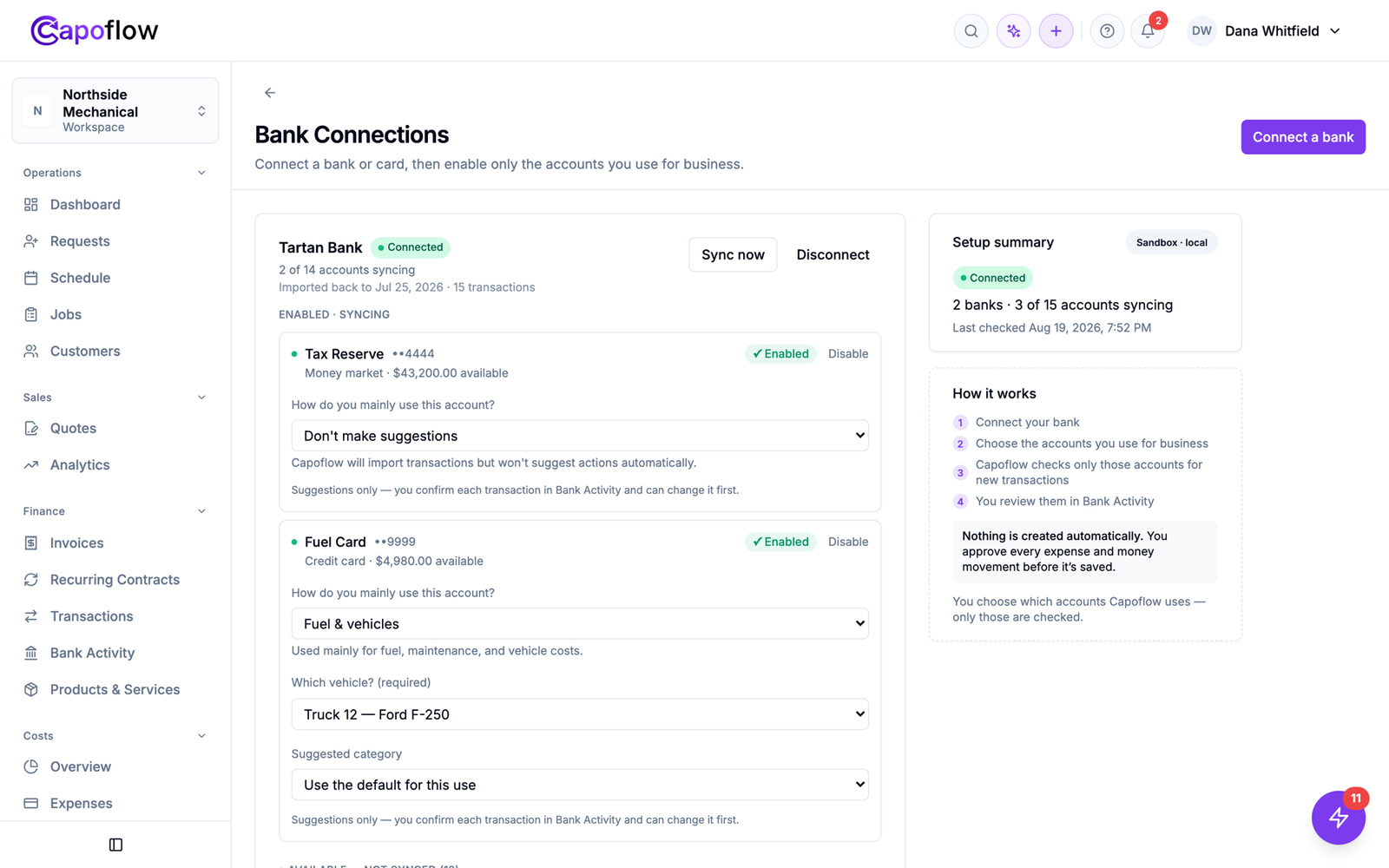
Connecting a bank returns every account it can see, and all of them start switched off. You turn on only the ones you actually run the business through. Then you say what each one is for in plain language: this card is fuel for Truck 12, this account is a tax reserve I do not want suggestions from.
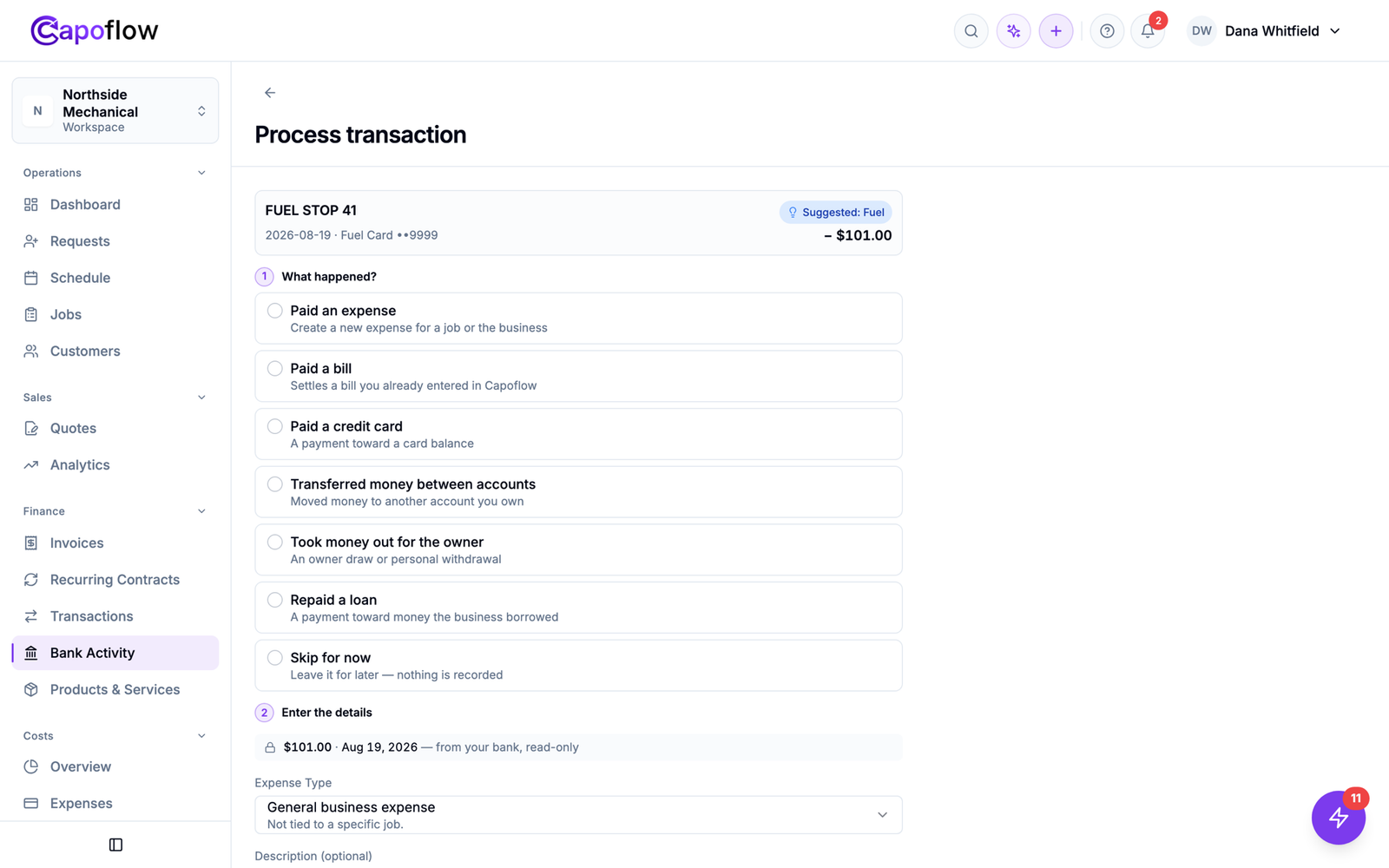
The few transactions that cannot be placed get a plain question, what happened here, with answers a business owner recognises: paid an expense, paid a bill, moved money between accounts, took an owner draw. The amount and the date come straight from the bank and cannot be edited. You are categorising, not bookkeeping.
The measure of this feature is how little it asks of you. Most of what arrives resolves on its own, and what is left is short enough to finish over a coffee.
Matches confirm themselves and noise is hidden, so what reaches you is a handful of genuine exceptions a week. If the list keeps growing, something needs a role rather than more reviewing.
A cleared payment lands on the job it belongs to and the truck it was spent on, so the numbers you already rely on stay current on their own.
Everything flows into the expenses, bills, checks and payments Capoflow already keeps. Nothing new to maintain.
Through Plaid, read only. Capoflow never sees or stores your bank login.
Everything arrives switched off. Turn on only the accounts and cards you run the business through.
Operating, fuel for a specific vehicle, financing, or excluded. One answer per account.
Matches confirm themselves. You handle the few exceptions and the queue goes back to empty.
Nothing about connecting a bank should add a new chore. These are the specific jobs it takes off the pile.
Instead of scanning a statement for which checks have landed, the ones that cleared are already marked. What is still outstanding is what is left.
Fuel spend usually arrives as one lump on a card statement. Tied to a vehicle, it turns into cost per truck without anyone photographing receipts.
Moving money to a tax reserve is not an expense, but a naive feed records it as one. Paired and hidden, your month stops looking worse than it was.
Costs land against jobs as they clear, so job profit is current instead of something you find out about three weeks later.
No. The connection is read only. Capoflow can see transactions in the accounts you choose to connect. It cannot initiate payments or transfers, and it never stores your bank login. Access runs through Plaid and you can disconnect at any time.
No, and deliberately so. Capoflow is not an accounting ledger and does not try to be. It uses your bank activity to confirm the expenses, bills, invoices and checks you already record, and to attribute costs to jobs and vehicles. Your accountant’s books stay where they are.
Mark a card as a fuel card and assign it to a vehicle. Its charges then become vehicle expenses attributed to that truck, so the operating cost per vehicle builds itself without anyone keying in receipts.
No. Transactions that match a record you already have are confirmed quietly on that record, transfers between your own accounts are paired and hidden, and accounts you mark as non operational are ignored entirely. Only what cannot be placed reaches your list.
Capoflow connects through Plaid, which supports most US banks and credit unions. You choose which of the accounts it returns are switched on. The rest are stored but never synced.
Bank Activity is included on the Business plan, for account owners and admins.
Print them on your own stock and Bank Activity marks them cleared when they hit the statement.

Run your business with clarity.
Keep your work, money, customers, and team connected. Know what’s happening, where your money is going, and what needs attention.
Every job. Every dollar. Every detail.

